BASSROOM | Fix Your Low End

Sale price£59.00 GBP 5.0 (330 reviews)

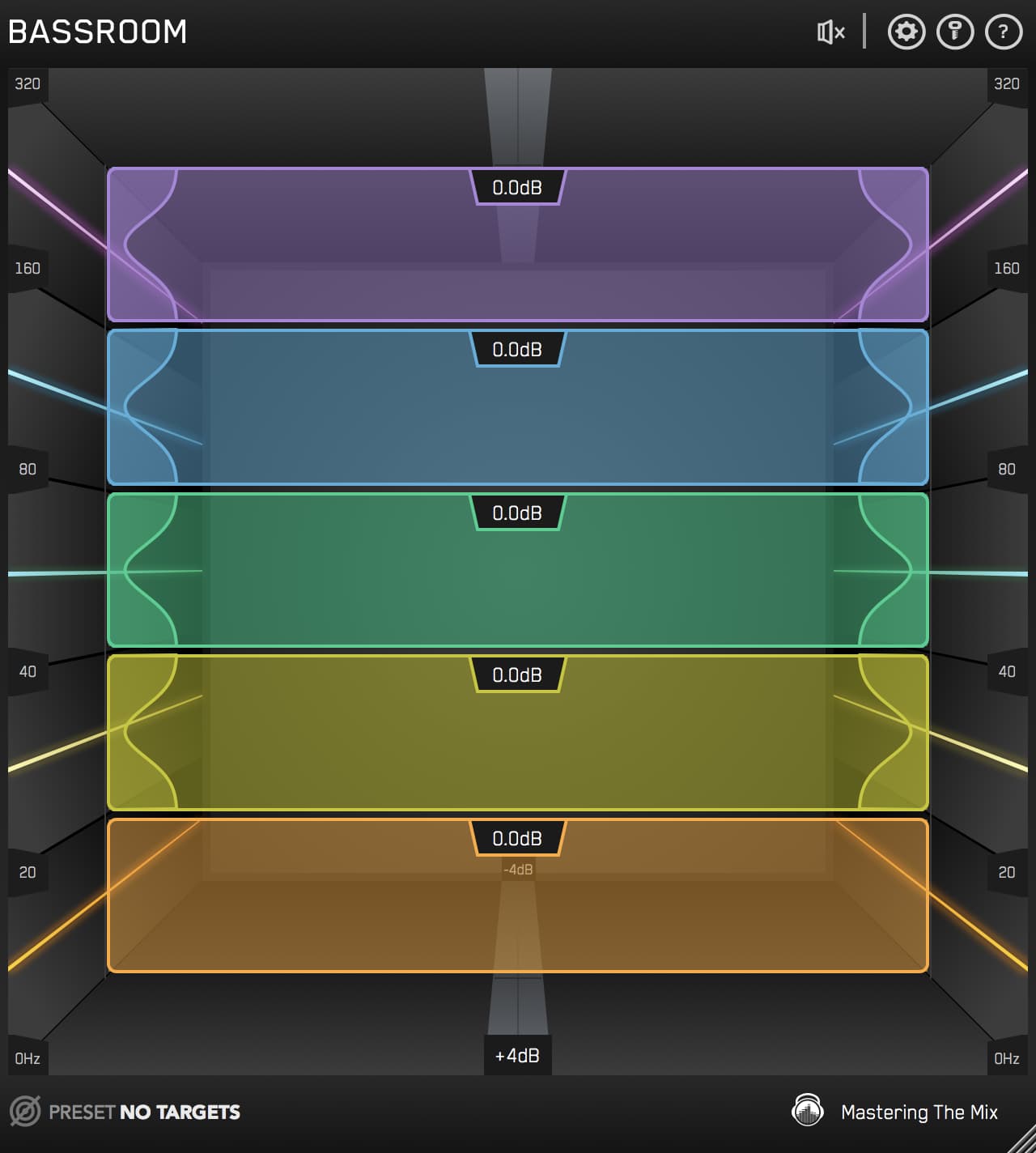
When your low-end is muddy or weak, your entire mix suffers. BASSROOM shows you exactly how to shape it, for low-end that hits hard, sounds clear, and translates across every system.

0:00 0:00
Free Bundle Buy BASSROOM, get Mastering Essentials free

30 Day Money Back Guarantee

Pro Reviews

Music Tech

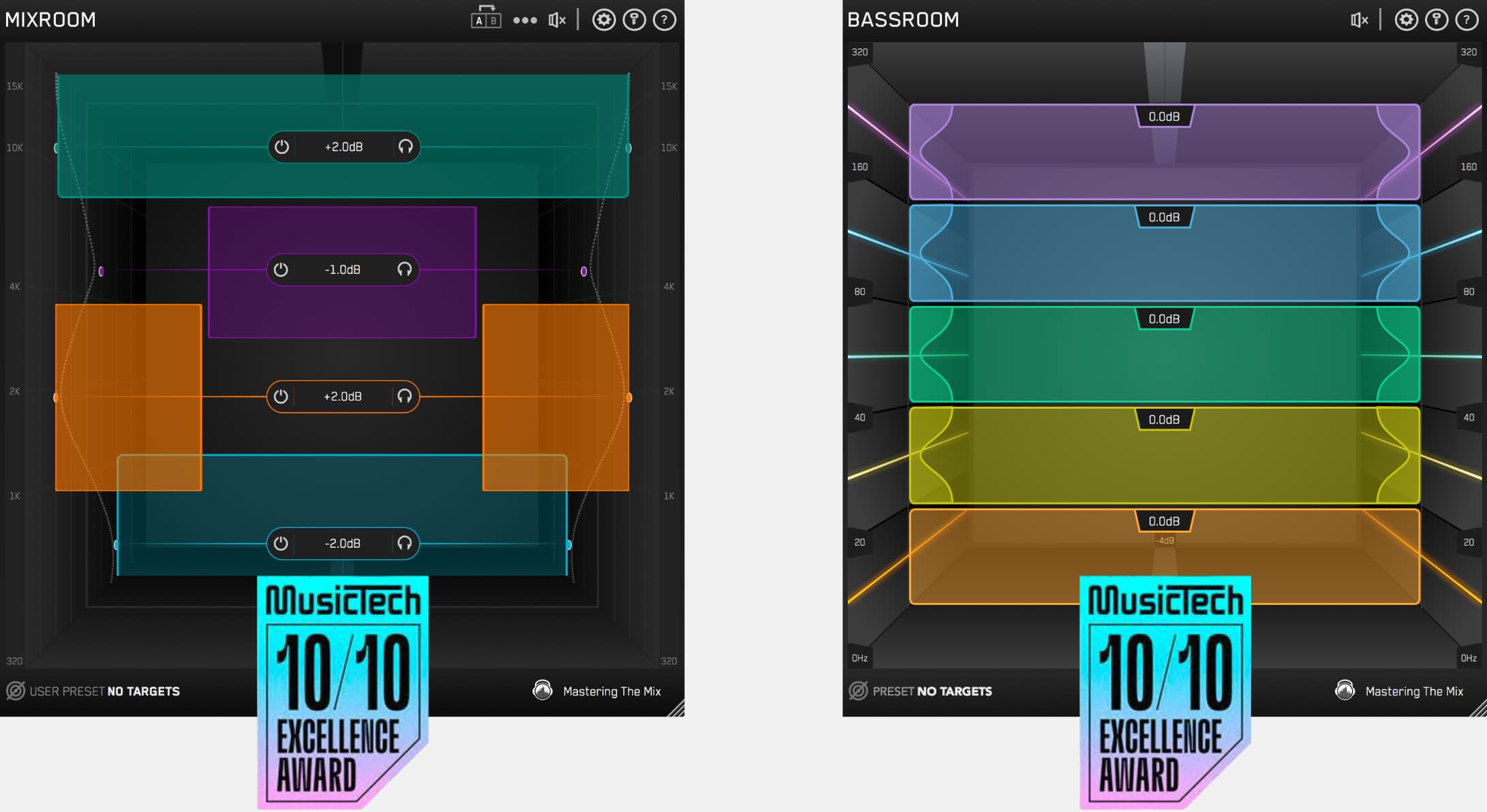
10/10 Excellence Award

An excellent plug-in tool that’s easy to use, with a smooth and transparent sound. BASSROOM helps improve a tricky area of the mix with consistently effective results.
Gary Noble grammy award winner reviews BASSROOM mixing plugin.

Gary Noble

3 X Grammy Winner (19 Nominations)

BASSROOM is great. It makes it really easy to dial in your low end.

Dirty South Review

Dirty South

Headline DJ

This is the plugin that I’ve been missing on my master bus! It really helps me nail the bass in my mix and have it sounding big and tight. A MUST HAVE!!!

BASSROOM | Final Mix and Mastering EQ

Overview Video

Impressive Results

The preset system is 100% unique to your music. It couldn't be easier to get great sounding results

Unbelievably Transparent

The unique filters in BASSROOM are optimised to shape low-frequencies. You won’t find another plugin that can adjust bass more transparently, retaining the punch and clarity of your music.

30-Day Money Back Gaurantee

You don't love BASSROOM, you don't pay!

How to use BASSROOM step 1
01

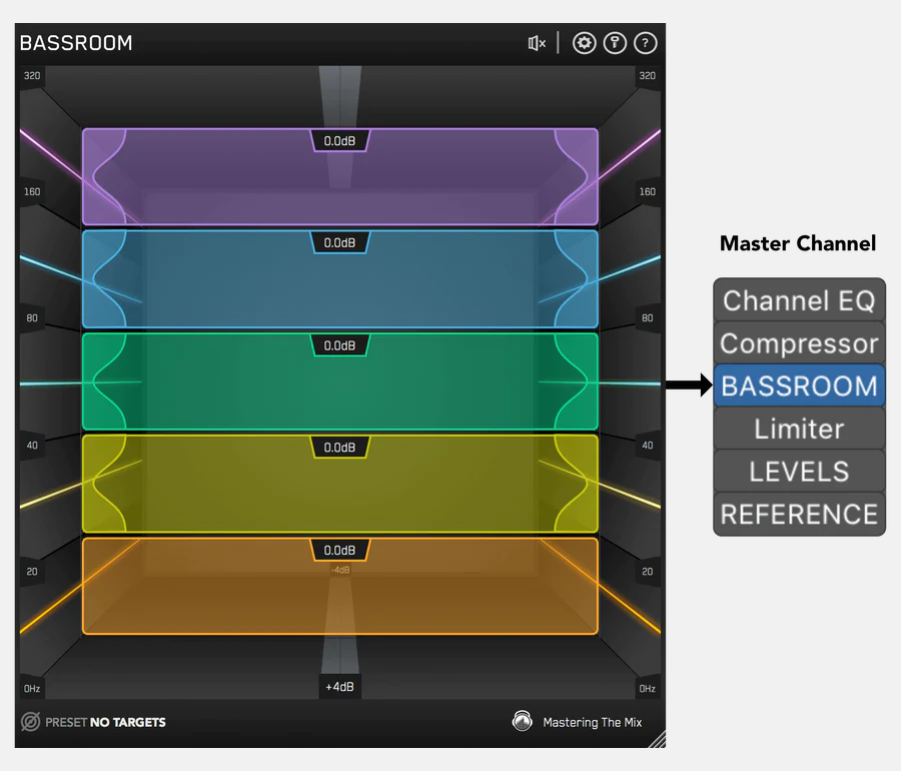
Load On Master Channel

BASSROOM uses complex algorithms that accurately identifies how the human ear perceives low-frequencies relative to the balance of the whole mix. For that reason it should be loaded on your master channel so it can analyse and be applied to your whole mix.
How to use BASSROOM step 2
02

Choose A Preset

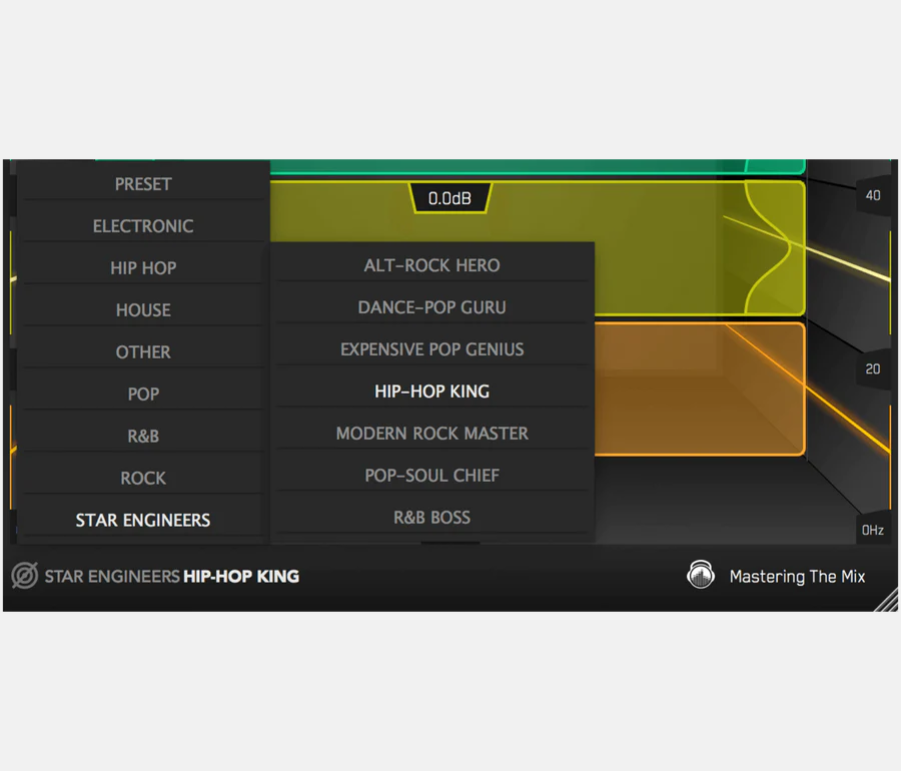
To get the most value from BASSROOM, start by selecting a preset that best suits the material you’re working on.
How to use BASSROOM step 3
03

Or Create A Target

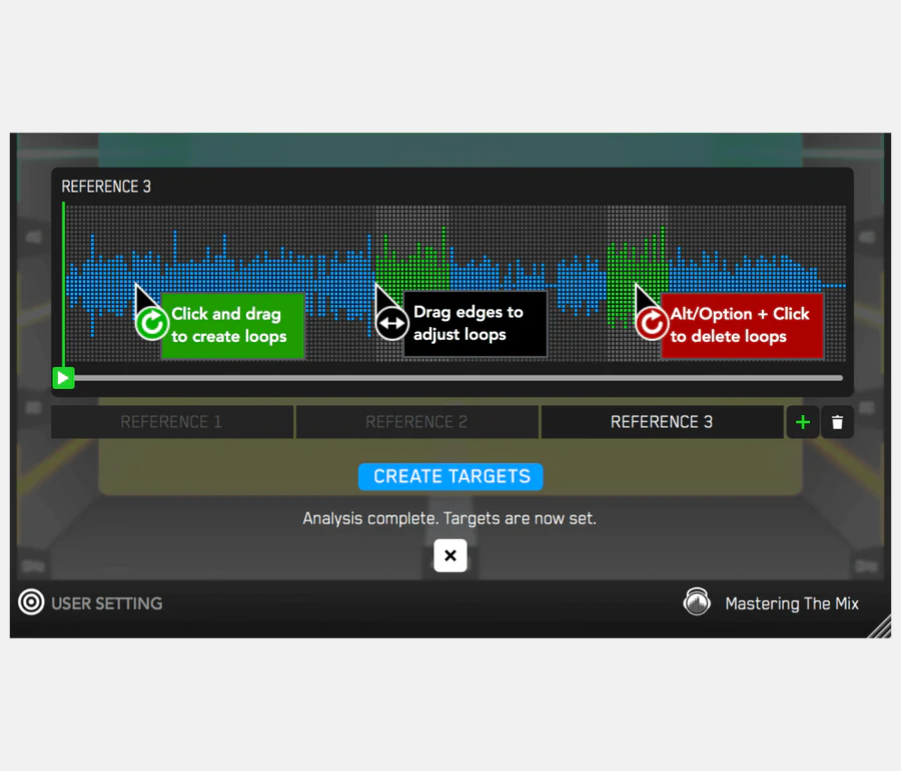
You can create your own target values by clicking the target icon in the bottom left corner and importing reference tracks. 
How to use BASSROOM step 4
04

Shape Your Low-end

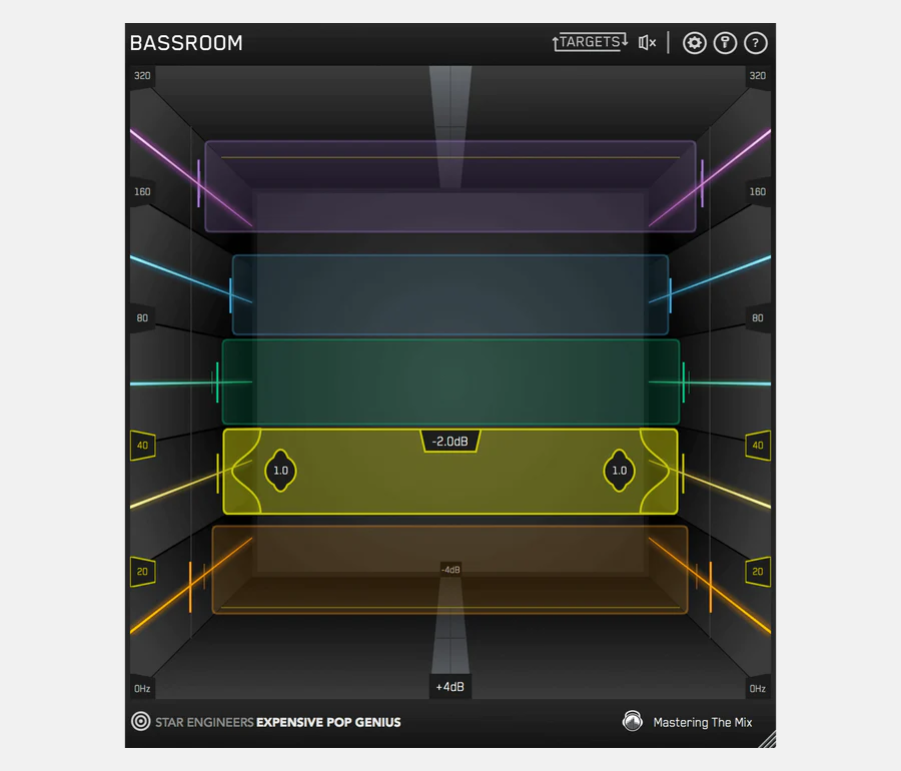
Now monitor a bass heavy section of your production (i.e. the drop or chorus), and you’ll see the targets move to the suggested EQ positions based on the tonal balance of your mix compared to the tonal balance of your preset. Use the targets to get a great starting point, then adjust by ear to tweak your low-end to perfection. The algorithm accounts for differences in loudness, so the targets will be accurate and relevant whether you’re mixing or mastering.
How to use BASSROOM step 6
05

Level Match

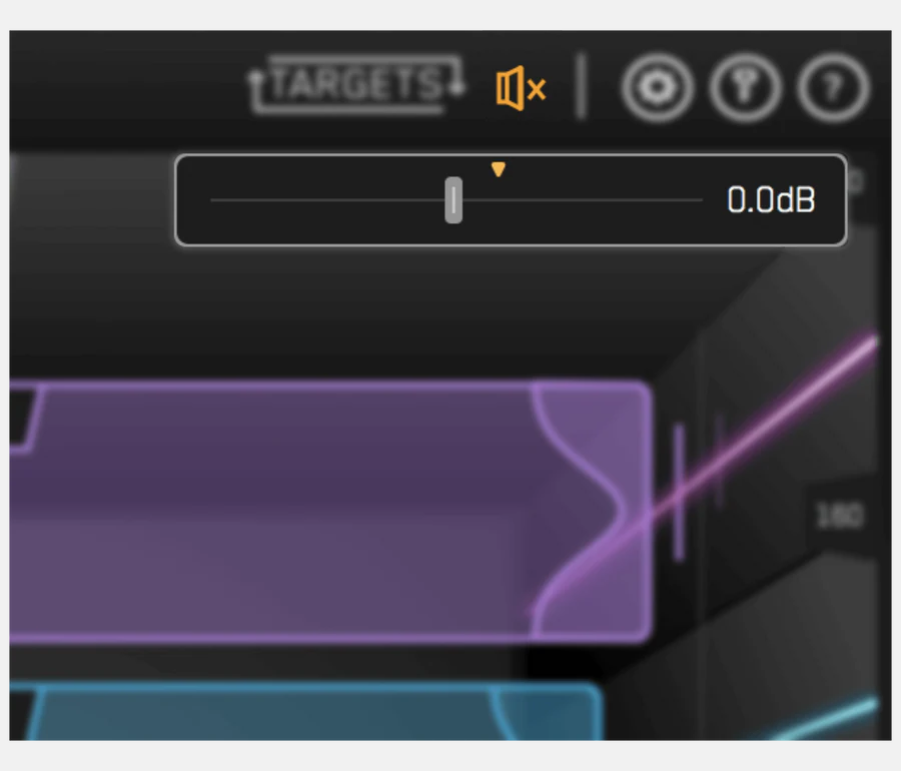
The EQ adjustments may have changed the overall gain of your audio. If the gain has changed by more than 2dB the speaker icon will turn orange. Hover your mouse over the bypass icon to open the output gain and level match pointer. Match the gain slider to the level match pointer to match the perceived loudness of your audio before it passed through BASSROOM.
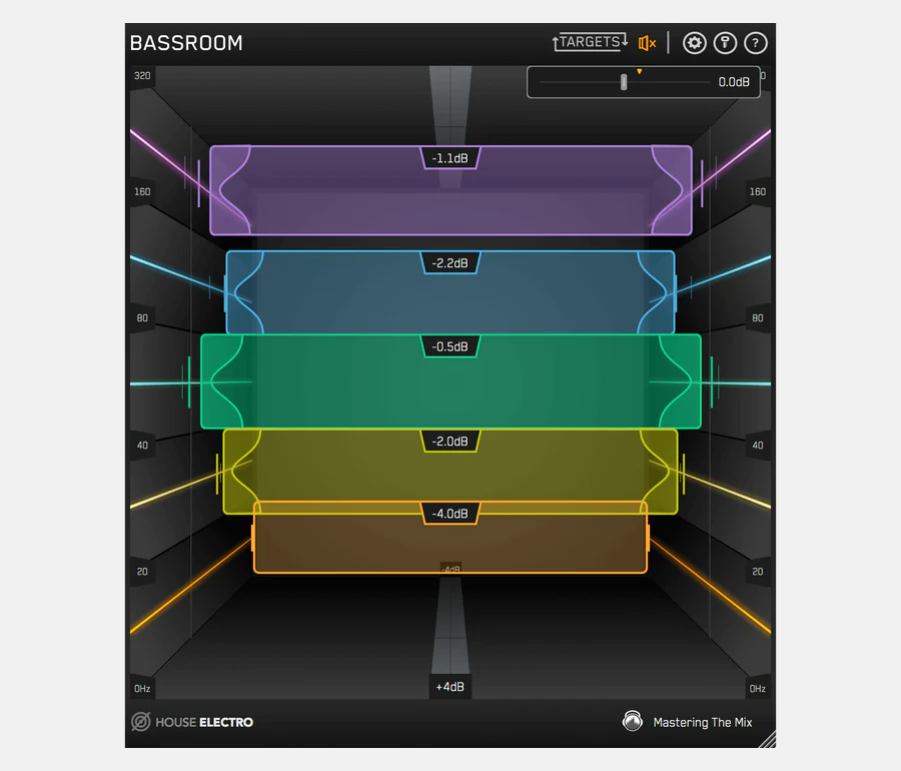
How to use BASSROOM step 6
06

Hear The Difference

Not only will your low-end fall into place, but the level matching will give you a well balanced sound across the whole frequency spectrum. Toggle bypass on and off to hear the difference.
01

Load On Master Channel

BASSROOM uses complex algorithms that accurately identifies how the human ear perceives low-frequencies relative to the balance of the whole mix. For that reason it should be loaded on your master channel so it can analyse and be applied to your whole mix.

02

Choose A Preset

To get the most value from BASSROOM, start by selecting a preset that best suits the material you’re working on.

03

Or Create A Target

You can create your own target values by clicking the target icon in the bottom left corner and importing reference tracks. 

04

Shape Your Low-end

Now monitor a bass heavy section of your production (i.e. the drop or chorus), and you’ll see the targets move to the suggested EQ positions based on the tonal balance of your mix compared to the tonal balance of your preset. Use the targets to get a great starting point, then adjust by ear to tweak your low-end to perfection. The algorithm accounts for differences in loudness, so the targets will be accurate and relevant whether you’re mixing or mastering.

05

Level Match

The EQ adjustments may have changed the overall gain of your audio. If the gain has changed by more than 2dB the speaker icon will turn orange. Hover your mouse over the bypass icon to open the output gain and level match pointer. Match the gain slider to the level match pointer to match the perceived loudness of your audio before it passed through BASSROOM.

06

Hear The Difference

Not only will your low-end fall into place, but the level matching will give you a well balanced sound across the whole frequency spectrum. Toggle bypass on and off to hear the difference.

How to use BASSROOM step 1How to use BASSROOM step 2How to use BASSROOM step 3How to use BASSROOM step 4How to use BASSROOM step 6How to use BASSROOM step 6
  • 5 stars: 315 (95%)
  • 4 stars: 15 (5%)
  • 3 stars: 0 (0%)
  • 2 stars: 0 (0%)
  • 1 star: 0 (0%)
D
David ROGERS

alright

E
Enrico Pianigiani
One of the best MTM plugins

One of the best MTM plugins.
Easy to use, Bassroom can help to get clarity and a powerful bottom end in your mixes.
A must to have for mastering.

A
Anonymous
Mix Buss Magic

This plugin has given me a powerful and essential new tool for not only shaping the low end of my mixes, but for redefining the entire mix itself.

I
Ivan Tresoldi
It works great!

Put it on your master, choose your style, follow the recommendations, and your low end will sound amazing. Highly recommended!

R
Rodney Ronquillo
Love it! Makes my EDM projects sound punchier!

I really love this plugin! I create and produce a lot of the pop, RnB and EDM subgenres and many times need to balance the entire mix with a better low-end, to give it more strength and punch. Especially for the EDM and RnB genres which require a strong low end with the kick drums, without affecting the entire mix and mastering. I've been wanting Bassroom for a while and it has been worth the investment. Highly recommended!

W
Wolner
Awesome! My low end is perfect now 🤌👌

Awesome!!!

W
Will
Does what it says it will do

very pleased with my initial results

C
Cosa Custode
Really good plugin

easy to use, bring that last review before mastering, I love it <3

V
Vincenzo Attanasio
Moodeck - Bassroom review

I'm an artist who produces melodic house, and as everyone knows, this type of music requires a strong focus on the low frequencies during mixing and mastering. The bassroom plugin personally makes it easier for me to control the lows, and it has greatly improved my masters. I highly recommend it.

K
Kevin Orsie
So far I love it

So far I love using this plugin it worked really good I used it on the mix track for my last song to master with and it worked really well

J
John Harger
Big difference!

Amazing! Effortless! Bassroom and Mixroom together are magnificent. Add a limiter and you've got a nearly finished product, and with few personal tweaks you're done. The presets really give you a mix worth selling.

b
blackSPYDER
Great Stuff Here.... Just Buy It, & Think Later

Productions Better Over Night.... Thank You!

V
Vincent
Clear and dimensional

A more balanced EQ, greater precision and depth in the bass. This plugin is in my toolbox of favourite tools.

R
Russell Crass
Bassroom

Could use more range on the boost and cut.

D
Dexter247
First low-end plugin that displays the low end the way I hear it.

I've been recording music for decades and working with Pro Tools since '97 and this is the first (and only) plugin that has provided a visual reference for bass that corresponds to how I hear it. I just started working with it today and I am amazed at how easy it is to balance the bottom end using the provided targets. I'm currently evaluating the full suite of plugins here and I have to say if the rest are as useful I will be purchasing the catalog.

B
Bill
I Iove this plugin

This plugin is having a dramatic effect on my mixes. The UI is super cool/unique and it's an amazing SOUNDING EQ. The targets are helping me develop my skills. It's really helping me get that big-yet-clean low end I've been looking for. Mix Room is awesome too. BIG fan of this company now!

F
Franck
Amazing plugin.

Bassroom works efficiently and is simple and very instinctive to use. It s a great tool for the low end in addition to Mixroom for the rest of spectral range. Another mandatory go to plugin 👍

S
Steve P
Bassroom.

Really excellent plug-in. Simple and intuitive to use. Has helped me a lot!

L
Lex
Great - just lacks one thing...

Overall, excellent and quick to use to balance out the bass especially with reference tracks. I would like to see a "Freeze Targets" button or something that keeps the target bass response markers in place once you've chosen your preset or reference track - unless I'm missing something, this is very confusing as I think others have mentioned. I'm looking at the markers moving around whilst trying to adjust frequencies and the targets keep changing etc - this part's not very intuitive IMO. Great work though from the devs and would definitely recommend!

F
Fishowner
Wicked Plugin

This Plugin is awesome. I have it hand in hand in hand in hand with MixRoom 1st, BassRoom, Limiter, Reference and then Level's. Thanks for the great sale's. I can't wait to check out your other plugins when time permit's. Thanks, you cats rock.

G
Gustavo Lopez
Simple and effective

It helps to stop second-guessing on the bass area, in my opinion, the hardest part of a mix. Be aware of the reference you are using. I prefer to choose a reference that is similar to the track, rather than a generic one. If you have "Mixroom" and you can use the same reference and apply that process.
Make sure your mix is already well mixed as much as possible, including compression. Use it only at the very end of the process, to make sure the bass region sits well in the mix. This plugin will not fix poorly processed bass frequencies.

T
Tiago Morais
INCREDIBLE!!!

A plugin that allows you to shape your bass tone to the point.

S
Steve Hanlon
Holy mother of Zeus!

Man, this plug-in works! Cleaned up my the bass in my mix and got me a lot closer to my reference mix! No brainer purchase at the price point and quick results!

R
Ron van Niele
BassRoom

Does what it is supposed to do, and very well! Recommended

A
Arthur
A pivotal product.

I’m learning mastering at the moment. And I’m at the stage of initial application, but this serves a very useful purpose, this being the real-time consolidation of theory into practice, with first person results.

As Bassroom is the initial plugin in my mastering chain, and upon application, its results became quickly evidential, and that’s why I recommend it!

B
Brian
So intuitive

It's easy to use and really shapes a well balanced low end

K
K.
Very handy helper

OMG!!! This plugin was a game changer for me.
Bassroom is very useful when makin’ music on the go and you need fast mixing starting points to the low end!!!

I think this will stay in my mixing chain for a long time!!!! 10/10 and a parrot sticker!

L
Luka Weuder
Good EQ-plugin!

Easy-to-use EQ-plugin to achieve a professional sounding low-end

M
Morgan M Green
Got the trifecta

Got Bassroom, Fuser, and Mix Room. I'm more confident to push that export button that is for sure. Things sounding clean.

C
Caloy
5 Stars

5 Stars

Q
Quinten Van de sande

all yur pluins are top quality

J
Juan José Romero
A must-buy for music producers.

Bassroom balances and cleans the bass frequencies very well.

It helps you create a perfect low end in the mix.

BASSROOM | Final Mix and Mastering EQ

Watch The Walkthrough Video

Mac System Requirements

OS X 10.15 or higher. 64-bit AU, VST 3 or AAX host.
Apple Silicon Native.

Download Mac Installer

Windows System Requirements

Windows 10 or higher. 64-bit VST 3 or 64-bit AAX host.

Download Windows Installer

Mac System Requirements

OS X 10.15 or higher. 64-bit AU, VST 3 or AAX host.
Apple Silicon Native.

Download Mac Installer

Windows System Requirements

Windows 10 or higher. 64-bit VST 3 or 64-bit AAX host.

Download Windows Installer