
You've finished the master. You bounce it, drag it into your distributor, hit submit. A week later a friend listens on their phone and says it sounds quieter than every other track in their playlist. Or it clips on cheap earbuds. Or the chorus vanishes in their car. Super annoying.
None of those issues are mysteries. Each one has a specific cause, a specific value you can read, and a specific number it should sit at before the track leaves your studio. The reason most producers don't catch them is that they don't run the check. They don't run the check because nobody told them what to look at.
This is the pre-release checklist. Five master measurements you read in EXPOSE 2, in order, before any track leaves the studio. Total time: about five minutes. Total revisions saved: a lot of them.

1Loudness: Hitting The Right Band For The Platform
Streaming platforms don't play your master at the level you bounced it at. They normalise. Spotify and YouTube target around -14 LUFS Integrated. Apple Music is closer to -16. SoundCloud doesn't normalise at all. If your master is louder than the target, the platform turns it down. If it's quieter, some platforms turn it up.

The mistake is mastering at -8 LUFS thinking it'll sound bigger on Spotify. It won't. Spotify pulls it down to -14 LUFS, and now your over-limited master sounds smaller and less dynamic than someone else's -10 LUFS master that wasn't hammered as hard. You lost the loudness war by entering it.
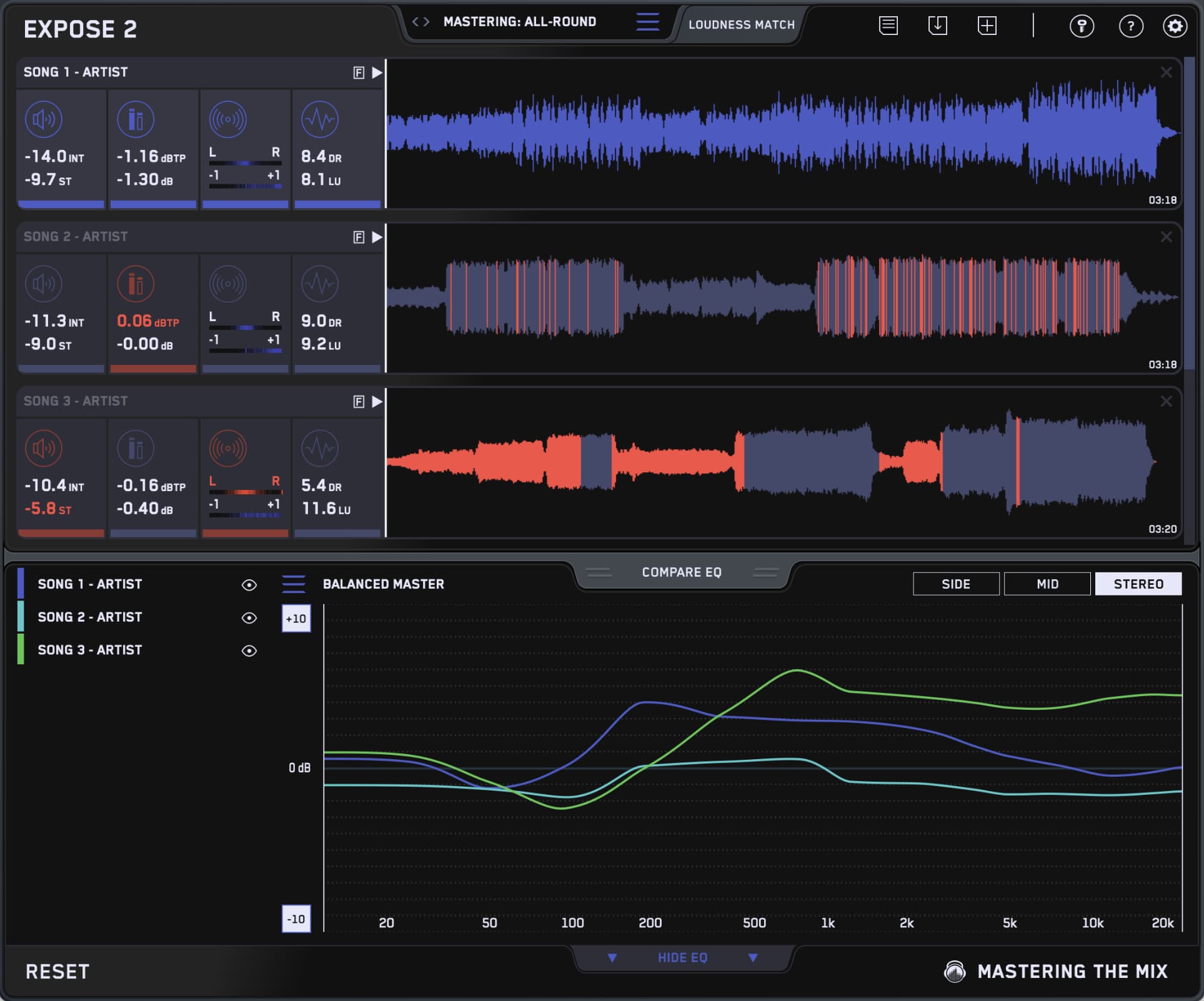
EXPOSE 2's Loudness section reads two values. Integrated LUFS is the average across the whole track. Aim within 1 dB of your platform target. Short-term LUFS is a moving 3-second window. Avoid going above -6 LUFS short-term. If you do, you've over-compressed somewhere, and the punch will be gone after the platform normalises.

EXPOSE 2's presets handle the platform targets for you. Pick Spotify, Apple Music, YouTube, SoundCloud, CD, or Vinyl, and the section turns red if your master is outside the accepted band. Pass the loudness check, move on. The post on hitting the perfect LUFS every time goes deeper on the loudness side.
- Integrated LUFS sits above -10 and your dynamic range reading drops below 5.
- Short-term peaks regularly cross -6 LUFS during the chorus.
- Your master sounds smaller than commercial references when you A/B at the same playback level.
- The limiter is doing more than 3 dB of gain reduction on the loudest sections.
2True Peak: Spotifys Advice (Not Mine)
Sample peak and true peak aren't the same thing. Sample peak measures the loudest digital sample. True peak measures the loudest analog level the signal will reach when a DAC reconstructs it for playback. The difference can be 1 to 3 dB. That difference is what clips on consumer devices.
The rule is simple when optimizing for Spotify. Aim for True Peak no higher than -1 dBTP, they even request -2dBTP for louder masters. Apple's Mastered for iTunes spec asks for it. Lossy codecs (AAC, MP3) introduce intersample peaks above 0 dBFS, and consumer DACs and phone speakers can't compensate. Anything that hits 0 dBFS in your bounce will clip somewhere in the chain.

EXPOSE 2's Peak section shows both Sample Peak (in dBFS) and True Peak (in dBTP). Watch the dBTP reading. If it's at 0 or above, drop your limiter's output ceiling to -1.0. If it's between -1 and 0, you're cutting it close, and codec conversion will likely push the peaks over (you will need to turn on true peak limiting in your limiter). The fix is one knob, takes thirty seconds. The cost of skipping it is a master that sounds clean in your studio and distorted on someone's earbuds.
I ran the tests, and I had to change my mind on this one. Turning true-peak limiting off actually gave me a punchier master. Here’s why: true-peak limiters clamp down on intersample peaks... tiny level spikes that only exist when audio is converted back to analog. The thing is, they’re inaudible on almost every playback system. So when you limit them, your limiter works harder and kills the transient punch that you CAN actually hear. With true-peak off, the music breathes more, drums hit harder, and the groove feels alive. Now, I keep true peak limiting off and set my ceiling around -0.2 dB, and my masters sound clean and punchy. I was wrong about this... it just sounds better. Trust your ears, not the meter.

Jimi Hendrix, The Who, Pantera
"It's always good to identify any problems before sending audio to a client. That's exactly what Mastering The Mix's new EXPOSE quality control app does, and much more."
Try EXPOSE 2 free →3Stereo Field: Will It Hold Up In Mono?
Phone speakers are mono. Most car FM is functionally mono on the low end. Club PA bass bins are usually summed. If your master has phase issues, those listeners are getting a thinner, weaker version of the song than you bounced. They won't be able to tell you why. They'll just skip.
EXPOSE 2's Stereo Field section shows two heat maps. Left/Right Stereo Balance shows whether your mix leans to one side over the duration of the track. A symmetrical reading means the centre is holding. Phase Correlation is the more important one. Readings near +1 mean the left and right channels are highly correlated and will sum cleanly to mono. Readings drifting toward 0 are uncorrelated. Anything passing through 0 toward -1 means parts of the signal will cancel when summed.

The benchmark is simple. Phase correlation should sit mostly between +0.4 and +1 across the whole song. Brief dips toward 0 during stereo-heavy moments (a wide reverb tail, a panned guitar) are fine. Sustained dips below 0 mean something in the mix is going to disappear in mono. Common causes: layered samples that don't align, microphones picking up the same source out of phase, stereo wideners pushed too hard. The post on fixing channels fighting for space covers the upstream side.
4Dynamics: Did You Squash The Punch Out
EXPOSE 2's Dynamics section shows two values. DR (Dynamic Range) measures short-term punch, the difference between transient peaks and the average level over a moving window. LU (Loudness Range) measures long-term variation, the difference in loudness between the quietest and loudest sections of the song.

The targets depend on genre, but the warnings are universal. If your DR is below 4, your master has been limited to a brick wall. If your LU is below 2, the chorus is the same loudness as the verse and the song lost its dynamic shape during mastering. Pop and electronic typically land between DR 5 and 8, with LU between 3 and 6. Acoustic, jazz, and classical run higher: DR 10 and up, LU 6 and up.
The check is comparative. Drop a commercial reference of the same genre into EXPOSE 2 and read its DR and LU values. Yours should be in the same neighbourhood. If you're 3 dB lower on DR than every reference in the genre, you've over-mastered. Pull back the limiter, re-bounce, re-check.
An LU below 2 isn't a mastering decision, it's a mastering accident. The chorus needs to feel bigger than the verse. If both sections measure within 1 LU of each other after limiting, your dynamic shape is gone. The fix is upstream: pull back compression on the master bus, or back off the final limiter ceiling, then re-bounce.
5Compare EQ: Does Your Tonal Balance Match The Genre?
The first four checks are pass-fail. This one is comparative. EXPOSE 2's Compare EQ feature analyses the tonal balance of your master against either a genre preset (built from the sonic profiles of commercially released tracks) or a custom reference track you load in.

The output is a curve. Where your master deviates from the reference, you see exactly which frequency ranges are too hot, too thin, or where the energy distribution doesn't match the genre. Anything within ±3 dB across the spectrum is in the ballpark. Anything outside that needs an EQ adjustment before you bounce again.
This is the cold-truth check. The previous four told you if your master is technically broken. Compare EQ tells you whether it sounds like the genre or whether it's heading somewhere the genre doesn't go. Both are valid (sometimes you want to deviate intentionally), but the deviation should be a choice you noticed, not a surprise after release.
One often-missed move: EXPOSE 2 can compare the EQ balance of the stereo, mid, or side channels independently. If your full-stereo curve looks fine but the master still feels off, switch to Mid and compare again. A bright stereo image hiding a dull centre is a common failure mode for tracks that sound exciting on speakers and lifeless on phones, where you're mostly hearing the mid signal anyway. The wide mix with a rock-solid centre is the hallmark of a pro-level master, and EXPOSE 2 lets you verify both halves of that.
This post on Compare EQ - The Ultimate Tonal Balance Tool walks through this feature in detail if you want the full tour rather than the checklist version.
Five Checks. Five Minutes. No Re-Master.
Most pre-release problems don't come from a producer not knowing what to do. They come from skipping the check that would have caught the problem before upload. Loudness is in the right band. True peak is at or below -1 dBTP. Phase correlation stays positive. Dynamics are in the genre's range. Tonal balance is within ±3 dB of the reference.
Run all five before every release. Drop the bounce into EXPOSE 2, watch the section icons. Anything red gets fixed before the track leaves the studio. Anything green means you're free to upload. The five minutes you spend running the checklist is the five minutes that saves you a revision cycle, a delayed release, and the friend who tells you your track sounds quieter than the next one in their playlist.
Frequently Asked Questions
What loudness should you target before releasing a track?
Streaming platforms normalise, so aim within about 1 dB of the platform target. Spotify and YouTube sit around -14 LUFS Integrated and Apple Music nearer -16. Mastering much louder just gets turned down, leaving an over-limited master sounding smaller after normalisation.
Why does true peak matter more than sample peak?
Sample peak measures the loudest digital sample, while true peak measures the loudest analog level a DAC reconstructs on playback, which can be 1 to 3 dB higher. Lossy codecs introduce intersample peaks, so a bounce hitting 0 dBFS can clip on consumer earbuds and phones.
How do you check whether a master holds up in mono?
In EXPOSE 2 read the phase correlation in the Stereo Field section. It should sit mostly between +0.4 and +1 across the song. Brief dips toward 0 during wide moments are fine, but sustained dips below 0 mean parts of the signal will cancel when summed to mono.
What dynamics readings warn that a master is over-compressed?
In EXPOSE 2, a DR below 4 means the master has been limited to a brick wall, and an LU below 2 means the chorus is as loud as the verse and the dynamic shape is gone. Compare against a commercial reference of the same genre to confirm you are in range.