

Stereo is the part of mixing most producers are worst at judging. EQ you can hear. Compression you can hear. Stereo is sneaky. A wide chorus on your headphones collapses on a phone speaker. A track that sounds huge in the studio sounds thin in a car. Most stereo problems hide in plain sight while you're mixing, then surface as soon as the track plays anywhere else.
This post covers nine of the most common stereo problems in a mix, what each one sounds like, what STEREOVAULT shows you when it's happening, and the move that fixes it. Most of these don't sort themselves out at the mastering stage. They want fixing in the mix, before they ever reach a limiter.

1The Mix Feels Narrow Even Though You've Added Width
Symptom
You've widened the master bus. You've widened the synth bus. You've widened the BVs. The mix still feels narrow. Like it's stuck in a corridor.
What STEREOVAULT shows you
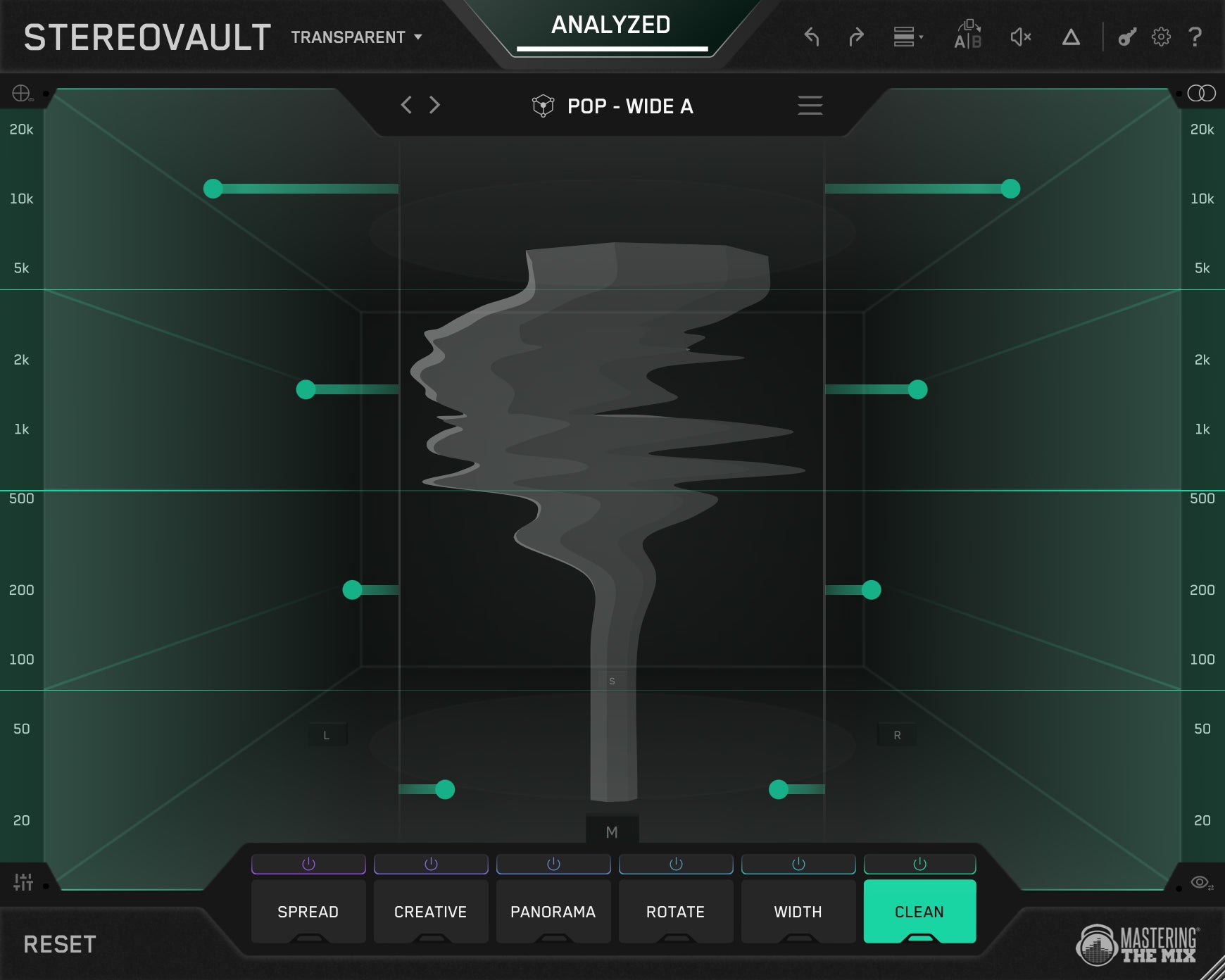
Open the visualiser across the full spectrum. Most narrow-feeling mixes have plenty of width above 5 kHz where the cymbals, breath, and air live, and almost none in the body of the mix between 500 Hz and 3 kHz where the vocal, guitars, and synths sit. Pushing the highs wider does nothing for the perception of overall width because the listener doesn't hear it where it counts.
The fix
Add width to the body, not the air. On the master or the relevant element bus, create a band covering 500 Hz to 3 kHz and use Pristine or Width to open it up. Pristine is the cleaner choice on full mixes. Width is more direct on individual elements. The mix opens up, and you didn't have to push the highs further than they already were.

2The Kick Or Bass Loses Punch In Mono
Symptom
The track sounds great in stereo. Switch to mono and the kick weakens, the bass thins, and the low-end goes flat. This is phase cancellation, and it's the single most common stereo problem in modern productions.
What STEREOVAULT shows you
Open the phase display. If the correlation in the low end (below 100 Hz) is sitting below zero, parts of the kick and bass are out of phase across the channels. When the speakers sum to mono, those out-of-phase parts cancel, and the punch you wrote disappears.
The fix
Stereo information below 100 Hz doesn't help a mix. It just hurts mono compatibility. On the bass bus or the master, use the Clean tab in Transparent Mode. Create a fixed band below 100 Hz and pull the side energy down. The lows tighten in stereo and survive in mono. The post on adding width to bass without losing mono compatibility covers the bass-specific version of this in more detail.


OneRepublic, Akon, Shawn Mendes
"STEREOVAULT is an absolute beast of an imager! I can be really transparent and subtle with it or completely re-invent the stereophony of a sound!"
Try STEREOVAULT free →3The Chorus Doesn't Lift The Way You Expected
Symptom
The chorus is supposed to feel bigger than the verse. More energy, more space, more lift. But it doesn't. It just feels louder.
What STEREOVAULT shows you
A/B the verse and chorus on your mix bus with the visualiser open. If the stereo image is the same shape and width across both, the chorus has no stereo lift. It's louder, but it isn't wider.
The fix
Stereo should breathe with the song. Verses tighter, choruses more open. Two ways to handle it. Either automate the SPREAD tab on the master to open up at the chorus, or leave the master alone and add the lift on individual element buses (BVs, synths, FX). Pristine on the upper mids of the BVs widens the chorus without dragging the centre apart. The lift you wanted shows up because the listener now hears stereo movement that wasn't there in the verse.

4The Vocal Feels Detached From The Mix
Symptom
The vocal sounds great in solo. Drop it into the mix and it sits on top of everything instead of inside it. Not because of EQ. Because of stereo placement.
Vocal Bus. Bypass And With STEREOVAULT.
Same vocal bus, level matched. Toggle Bypass and With STEREOVAULT while it plays. Listen for how the BVs and effects open up around the lead, giving the centre vocal a stereo bed to sit in instead of floating above a flat field.
What STEREOVAULT shows you
Solo the lead vocal channel, then the rest of the mix, and watch the visualiser. If the vocal is sitting in a narrow centre column and the mix is wide everywhere except where the vocal lives, the vocal has no stereo bed to sit in. It's a centre signal floating above a wide field.
The fix
Two things to check. First, the BVs, doubles, and vocal effects should be filling the stereo space around the lead, not duplicating its centre position. STEREOVAULT's Width on the BV bus, set to push the upper mids and highs to the sides, gives the lead a place to sit. Second, the music bus shouldn't be too wide in the 200-500 Hz range, which is where vocal body lives. If everything else is wide there, the vocal feels carved out. Pull that side energy back on the music bus and the vocal sits in.

5Snares Feel Smeared Or Phasey
Symptom
The snare doesn't punch the way it should. It feels softer than the hits suggest, and the transient seems to spread across the stereo field instead of cracking in the centre.
What STEREOVAULT shows you
On the drum bus or the snare channel, the visualiser shows side energy in the 1-4 kHz range that shouldn't be there. Snares are centre-mid signals. Side energy in that range usually comes from room mics, overhead bleed, or stereo effects that drifted onto the snare bus by accident.
The fix
Pull the side energy in the 1-4 kHz range back toward the centre using the Clean tab. The snare punches harder because the centre stops competing with smeared side information. If the snare is supposed to have width (like a stereo room recording), use Pristine instead. That way the width is intentional and clean, not accidental and phasey.

6Stereo Sounds Big On Headphones, Dies On Speakers
Symptom
The mix sounds enormous on headphones. Switch to laptop speakers, a phone, or a small Bluetooth, and the width vanishes. Sometimes the centre even sounds wrong.
What STEREOVAULT shows you
This is usually a Haas trick or excessive phase-based widening. The L-R differences that make headphones feel wide collapse to mono on small speakers. Watch the phase display (mani visual turns red) when you toggle to mono. If it dips dramatically, your widening is fragile.

The fix
Replace any Haas-style widening on critical elements with Width or Pristine. Both redistribute Mid/Side energy without phase tricks, which means they survive mono summing. Save Haas, Stretch, and Flux for non-critical elements that can collapse without damaging the mix. Keep Pristine and Width on anything that has to translate, including the master bus.
Before you bounce, sum the master to mono once and listen to the chorus. If the loudness drops by more than 1.5 dB or the kick noticeably weakens, you have a stereo problem somewhere in the chain. STEREOVAULT's phase display catches most of it during the mix, but a quick mono pass at the end is the final test. If a track holds up in mono, it'll hold up everywhere.
7Drum Overheads Or Room Mics Smear The Kit
Symptom
The kick and snare are tight in the centre, but the cymbals and room ambience feel like they're spreading the whole kit across the stereo field. The kit loses its position.
Drum Bus. Bypass And With STEREOVAULT.
Same drum bus, level matched. Toggle Bypass and With STEREOVAULT while it plays. Listen for the cymbals staying open up top while the kick and snare lock back into the centre. The kit holds its position instead of smearing across the field.
What STEREOVAULT shows you
On the drum bus, the visualiser shows side energy spread evenly across the spectrum from 200 Hz upward. The cymbal and room information is dragging everything wide, including the elements that should stay anchored.
The fix
Use Pristine on the higher bands (above roughly 2 kHz) to keep the cymbals open without smearing the snare. On the lower bands (below 200 Hz), use the Clean tab to keep the kick and toms centred. The kit holds its position. Cymbals stay wide. The kit sounds like a kit instead of a smear.

8Reverb Returns Make The Mix Cloudy
Symptom
The mix feels foggy. Slightly out of focus. Mute the reverb returns and the focus comes back. But muting them isn't an option, you wrote those reverbs for a reason.
What STEREOVAULT shows you
On the reverb bus, the visualiser shows side energy stacking up in the 200-500 Hz range. That's where reverb tails dump their stereo information, and that's where mix mud lives.
The fix
Use Width on the 200-500 Hz band to pull the side energy back toward the centre. The reverb stays present, the tail doesn't disappear, but it stops cluttering the low-mids. On the higher bands, leave the reverb wide. That's where the air and the sense of space live. Reverb that's tight in the body and open up top is the goal.
9The Upper Mids Feel Crowded And Two-Dimensional
Symptom
The mix is technically right. Vocal centred. Guitars panned. Snare up the middle. Keys spread. But the 1 to 4 kHz range still feels two-dimensional, like everything's stacked on top of itself. Vocals fight guitars for the same upper-mid space. EQ has done what it can. Panning has done what it can. The mix is still crowded.
What STEREOVAULT shows you
On the mix bus or the relevant element buses, the visualiser shows the upper mids all sitting at similar stereo positions. Everything is layered on top of itself in stereo space. EQ and panning can't fix this because the problem isn't level or frequency. It's stereo position.
The fix
Rotate is the move EQ and panning can't make. Where panning shifts level between left and right, Rotate tilts where energy sits inside the stereo field, and because you can rotate just the Mid or Side channel independently, you can reposition specific elements without pulling the whole mix off-centre. On the rhythm guitar bus, create a band covering 1 to 5 kHz and set Rotate to Side mode. Apply a small amount. The side information of the guitars in that range shifts position, opening up space in the centre for the vocal. Same trick on a keys bus, rotated in the opposite direction. Now the vocal, guitars, and keys each occupy a slightly different position in the stereo field through that critical range. The mix breathes.

Small amounts work best. You're not spinning the image. You're tilting specific frequency ranges by a few degrees to carve out space EQ alone couldn't find.
The post on mixing with STEREOVAULT walks through specific moves on individual elements, from sub bass to vocal groups to mix bus polish. Use this diagnostic post to spot the problem. Use that post to choose the move that fixes it.
Fix Stereo In The Mix, Not At Mastering
Most of these problems are still partially fixable at the mastering stage. A mastering engineer can pull side energy below 100 Hz to recover mono compatibility. They can't make your chorus lift, separate your vocal from the bed, or de-smear your snare. Those are mix decisions.
Open STEREOVAULT on the mix bus, run Analyze, watch the visualiser for a chorus, and the issues become obvious. Most mixes have two or three of these problems, not all nine. Fix the ones that are actually happening and your master gets a head start, your track translates better across speakers, and the next mix lands quicker because you know what to look for.
Frequently Asked Questions
Why does a mix feel narrow even after adding width?
Most narrow-feeling mixes have plenty of width above 5 kHz but almost none between 500 Hz and 3 kHz, where the vocal, guitars, and synths sit. Widening the highs does little for perceived width. Add width to the body of the mix instead, using Pristine or Width on that range.
Why does the kick or bass lose punch in mono?
This is phase cancellation. If correlation below 100 Hz sits below zero in STEREOVAULT's phase display, parts of the kick and bass are out of phase and cancel when summed to mono. Use the Clean tab in Transparent Mode to pull side energy down below 100 Hz.
Why does a mix sound big on headphones but die on speakers?
This is usually Haas-style or phase-based widening. The left-right differences that feel wide on headphones collapse to mono on small speakers. Replace that widening on critical elements with Width or Pristine, which redistribute Mid/Side energy without phase tricks and survive mono.
How do you stop reverb returns making a mix cloudy?
Reverb tails dump side energy in the 200 to 500 Hz range, where mix mud lives. Use Width on that band to pull the side energy back toward the centre so the tail stays present without cluttering the low-mids, while leaving the higher bands wide for air and space.