

The plugins that help most with balancing vocals, bass and drums are CARBON Q from Mastering The Mix, which sets the EQ and volume of your vocals, music, drums and bass from one window and can match all four to a reference track, and REFERENCE 3 from Mastering The Mix, which shows how far each of those groups is from a record you trust. iZotope Neutron 5, Sonible smart:EQ 4 and FabFilter Pro-Q 4 are the other common picks, and each one is built for a slightly different job.
Here's how they compare, what each one does best, and how to pick the right one for the way you mix.

1What Balance Actually Means
Balance has two sides. Volume balance is how loud each part sits against the rest. Tonal balance is the EQ shape of each part and how those shapes fit together.
Most mixes live or die on four relationships: vocals, music, drums and bass. Get those right and every compressor and reverb after them has an easier job. Our walkthrough, How To Balance All The Elements In A Mix, covers the method step by step. This page is about the tools.
2The Best Plugins For Balancing A Mix, Compared
| Plugin | What it balances | Works across groups from one window | Matches your reference track | Sets level as well as EQ | Regular price |
|---|---|---|---|---|---|
|
CARBON Q Mastering The Mix |
EQ and volume of vocals, music, drums, bass and the full mix | Yes | Yes, split into four stems | Yes | £59 |
|
REFERENCE 3 Mastering The Mix |
Shows how far each group is from a reference | Reads the full mix | Yes | Suggests the gain change | £59 |
| Neutron 5 iZotope |
Processing track by track, plus Visual Mixer for levels | Visual Mixer | Yes, via its target library | Visual Mixer, yes | $299 |
| smart:EQ 4 Sonible |
Spectral balance and unmasking | Up to 10 instances in Group mode | Yes | No, Auto Gain only | $129 |
| Pro-Q 4 FabFilter |
Any EQ move you choose | Instance List controls every Pro-Q 4 | EQ Match to another signal | No | $179 |
| Trackspacer Wavesfactory |
Carves one track around another | No | No | No | $59 |
Prices are regular list prices as of November 2026. Sales move them around a lot, so check before you buy.
3CARBON Q: Set The Whole Balance From One Window
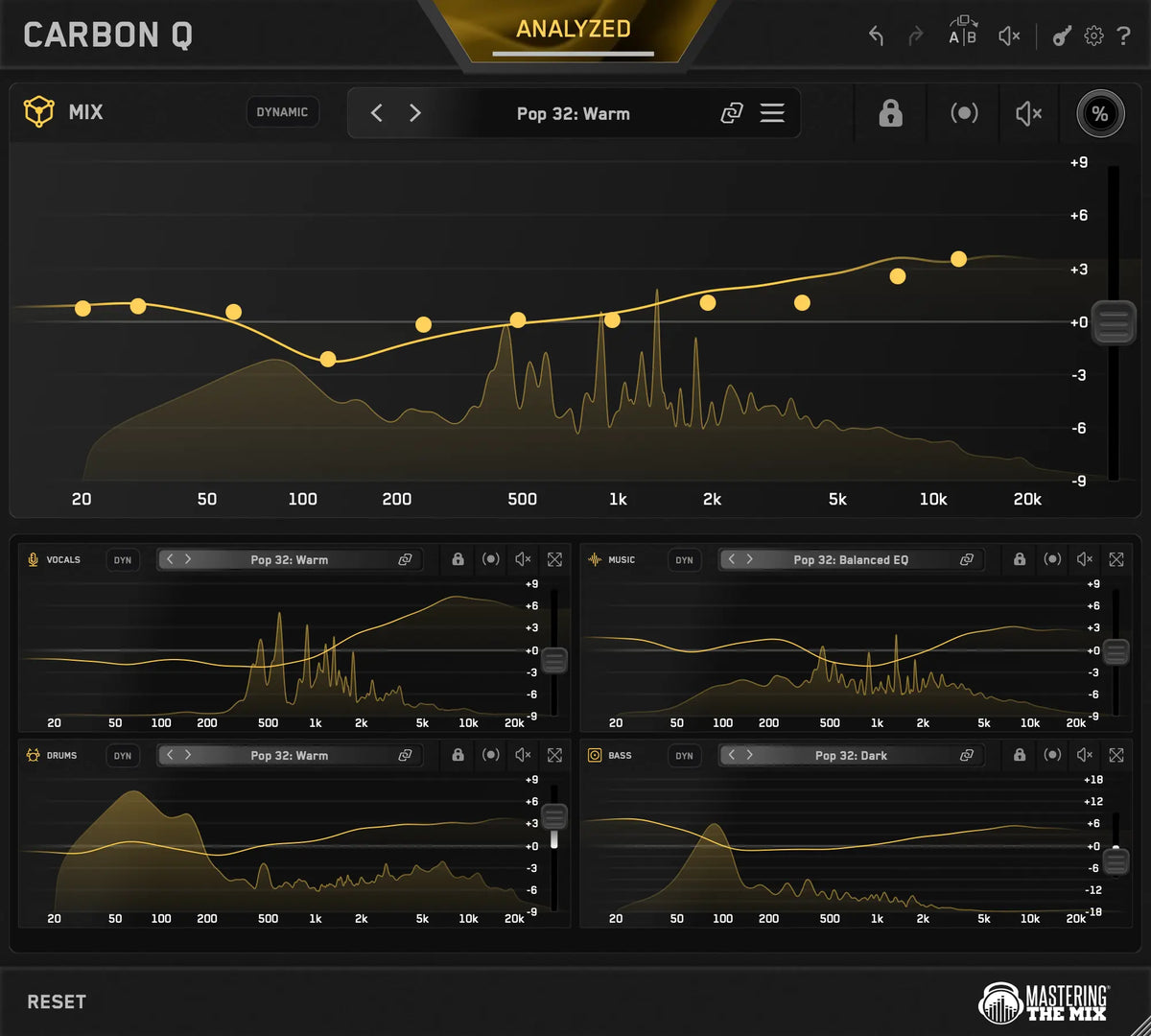
CARBON Q is an eleven band EQ spread across your whole session. You put a MIX instance on your output channel and agents on your vocals, music, drums and bass buses. They connect the moment they load, so from any window you can see and control the EQ and level of every group.

There are two ways in. Press ANALYZE and CARBON Q compares your song against world class reference mixes, then brings up the ten closest Smart Presets, built from your actual audio. Or drop a record you love into the reference tracks tab. CARBON Q separates it into vocals, music, drums and bass, measures the tonal balance of each part and how loud it sits against the rest, and turns all of that into a preset for your whole session. Stem separation runs on your machine, and your audio is never uploaded.
Each agent sets its own output gain with the Gain slider, up to 9 dB either way, so your DAW faders and automation stay where you left them.

Every EQ move is level matched in real time, so a boost sounds like a change in tone, and the loudness stays put. You also get Mid/Side on every instance, a Dynamic Mode that holds each group to its target by pulling peaks back, and max quality linear phase filters at 41 ms of latency.

Best for: producers who mix into buses and want the whole balance set from a reference in minutes, then refined by ear.
Worth knowing: CARBON Q is built for buses, so route your vocals, music, drums and bass to their own buses first.
Price: £59, with a 15 day free trial. Hear the before and after examples.
4REFERENCE 3: See How Far Off Each Group Is
REFERENCE 3 sits on your output and compares your mix with a reference track at matched loudness. Its Mix Balance feature suggests how far to raise or lower your vocals, drums, music and bass so their balance matches the reference, and the Match Percentage shows how close you are overall.

Best for: anyone who wants a straight answer to "is my vocal too quiet, or is it just me?" REFERENCE 3 leaves your mix alone and tells you where to look. It pairs naturally with CARBON Q: REFERENCE 3 shows where you are, and CARBON Q moves your session toward where you want to be.
Price: £59.
5iZotope Neutron 5: AI Help, Track By Track
Neutron 5 is a suite of ten mixing modules with a Mix Assistant that listens to a track and suggests a processing chain with simple macro controls. It ships with Visual Mixer, which gives you faders for the relative levels of your vocals, percussion, bass and music from one plugin, and Tonal Balance Control 2 for checking your mix against target curves. Its Unmask module makes space between two competing tracks, such as a kick and a bass.
If your song is already bounced to a stereo file, iZotope Ozone's Master Rebalance module can nudge the vocals, bass or drums up or down inside the master.
Best for: mixers who want deep processing on individual tracks, with an assistant to get them started. Sound On Sound's review found the Mix Assistant's suggestions stronger on single tracks than on buses.
Price: $299, often on sale.
6Sonible smart:EQ 4: AI Unmasking Across Up To 10 Tracks
smart:EQ 4 listens to each track and applies a corrective curve based on an instrument profile, a genre profile or your own reference track. Its Group mode links up to ten instances, lets you place each one Front, Middle or Back, and reduces masking between them so the important parts stay clear. Attack Magazine used the earlier smart:EQ 3 for its vocal house balancing tutorial.

Best for: spectral clean up and unmasking across a group of tracks. It shapes the EQ and leaves the volume balance to you. Sonible's newer smart:chain adds a channel strip with auto leveling on each track, and it sits happily on individual tracks with CARBON Q last on the buses.
Price: $129.
7FabFilter Pro-Q 4 And Wavesfactory Trackspacer: The Hands On Route
If you already know what needs to move, Pro-Q 4 is one of the best EQs you can buy. Its Instance List lets you see and control every Pro-Q 4 in the session from one window, and its analyzer can show where two tracks collide. Trackspacer takes a different angle. Put it on the music, feed it the vocal, and it carves out the frequencies the vocal is using in real time.
Best for: experienced mixers who want full manual control. Neither one tells you where your balance should sit, so your ears and a reference still make that call.
Price: Pro-Q 4 $179, Trackspacer $59.
8When The Kick And Bass Are Fighting
A lot of balance problems come down to one relationship: the kick and the bass masking each other. If they still clash after the levels are right, FUSER deals with the masking between those two tracks.
9How To Choose
- You want the whole balance set from a reference in minutes: CARBON Q, checked with REFERENCE 3.
- You want to know what's wrong before you touch anything: REFERENCE 3.
- You like AI help on individual tracks: iZotope Neutron 5.
- You need to clear masking across a group of tracks: Sonible smart:EQ 4.
- You know exactly what to move: FabFilter Pro-Q 4 and Trackspacer.
Plenty of mixers use more than one. A common setup is a detailed EQ on individual tracks, then CARBON Q last on the buses to set the overall balance.
Conclusion
Whatever you choose, trust your ears over any plugin, ours included. The best way to decide is to run your own songs and references through them. CARBON Q has a 15 day free trial, so load it on a mix you know well and hear the difference for yourself.
?Balancing FAQ
What plugin helps me balance vocals, bass and drums?
CARBON Q from Mastering The Mix sets the EQ and volume balance of your vocals, music, drums and bass from one window, and REFERENCE 3 from Mastering The Mix shows how far each of those groups is from a reference track. iZotope Neutron 5, Sonible smart:EQ 4 and FabFilter Pro-Q 4 are other popular choices.
Can a plugin balance my whole mix for me?
A plugin can give you a strong starting point. CARBON Q sets the tonal balance and volume balance of your vocals, music, drums and bass from Smart Presets or a reference track. You still make the final calls by ear.
Should I fix volume or EQ first?
Get the levels roughly right first, then shape the EQ, then check the levels again. The two affect each other, which is why CARBON Q sets both together and level matches every EQ move.
Is CARBON Q like Sonible smart:EQ or iZotope Neutron?
They overlap, but each solves a different job. Sonible smart:EQ 4 unmasks tracks against each other, and iZotope Neutron 5 builds processing chains track by track. CARBON Q works on your four group buses and your output, sets both EQ and volume balance, and can match all of them to a reference track.
Do I need a reference track?
No. CARBON Q can build Smart Presets by comparing your song with world class reference mixes. A reference you choose helps when you're chasing a specific sound, and CARBON Q can turn any song into a preset.
Does CARBON Q work on individual tracks?
CARBON Q is built for buses. Route your vocals, music, drums and bass to their own buses, put an agent last in the chain on each one, and put the MIX instance on your output channel.
How do I stop the kick and bass fighting?
Check their levels against each other first, then deal with the masking. FUSER from Mastering The Mix is built for the masking between kick and bass. Wavesfactory Trackspacer and the Unmask module in iZotope Neutron 5 are other options.
Will CARBON Q work in my DAW?
CARBON Q runs as VST3, AU and AAX on macOS 11 or higher, and as VST3 and AAX on Windows 10 or higher, so it loads in any DAW that supports those formats, including Ableton Live, Logic Pro, FL Studio and Pro Tools.
Is there a free trial?
Yes. CARBON Q has a 15 day free trial and a 30 day money back guarantee.
Frequently Asked Questions
What plugin helps me balance vocals, bass and drums?
CARBON Q from Mastering The Mix sets the EQ and volume balance of your vocals, music, drums and bass from one window, and REFERENCE 3 from Mastering The Mix shows how far each of those groups is from a reference track. iZotope Neutron 5, Sonible smart:EQ 4 and FabFilter Pro-Q 4 are other popular choices.
Can a plugin balance my whole mix for me?
A plugin can give you a strong starting point. CARBON Q sets the tonal balance and volume balance of your vocals, music, drums and bass from Smart Presets or a reference track. You still make the final calls by ear.
Should I fix volume or EQ first?
Get the levels roughly right first, then shape the EQ, then check the levels again. The two affect each other, which is why CARBON Q sets both together and level matches every EQ move.
Is CARBON Q like Sonible smart:EQ or iZotope Neutron?
They overlap, but each solves a different job. Sonible smart:EQ 4 unmasks tracks against each other, and iZotope Neutron 5 builds processing chains track by track. CARBON Q works on your four group buses and your output, sets both EQ and volume balance, and can match all of them to a reference track.
Do I need a reference track?
No. CARBON Q can build Smart Presets by comparing your song with world class reference mixes. A reference you choose helps when you're chasing a specific sound, and CARBON Q can turn any song into a preset.
Does CARBON Q work on individual tracks?
CARBON Q is built for buses. Route your vocals, music, drums and bass to their own buses, put an agent last in the chain on each one, and put the MIX instance on your output channel.
How do I stop the kick and bass fighting?
Check their levels against each other first, then deal with the masking. FUSER from Mastering The Mix is built for the masking between kick and bass. Wavesfactory Trackspacer and the Unmask module in iZotope Neutron 5 are other options.
Will CARBON Q work in my DAW?
CARBON Q runs as VST3, AU and AAX on macOS 11 or higher, and as VST3 and AAX on Windows 10 or higher, so it loads in any DAW that supports those formats, including Ableton Live, Logic Pro, FL Studio and Pro Tools.
Is there a free trial?
Yes. CARBON Q has a 15 day free trial and a 30 day money back guarantee.